nirmalakumarsahu
Spring Boot Exception Handling
| 📄 Articles | 👤 My Profile |




📑 Index
- 📌 Introduction
- 🌱 Exception Handling in Spring Boot
- 🛠️ Different Ways to Handle Exceptions in Spring Boot
- 1️⃣ Using try-catch (Local Handling)
- 2️⃣ Using @ExceptionHandler (Controller Level)
- 3️⃣ Using @ControllerAdvice / @RestControllerAdvice (Global Handling)
- 4️⃣ Using ResponseStatusException
- 5️⃣ Using @ResponseStatus on Custom Exceptions
- 6️⃣ Extending ResponseEntityExceptionHandler
- 🏆 Industry Best Practice
- 🚀 Implementation
- 🎥 Video Reference
📌 Introduction
❓ What is an Exception?
An exception is an unexpected event ⚡ that occurs during program execution and disrupts the normal flow of instructions.
👉 Examples in Java:
- 🔴
NullPointerException→ when trying to call a method onnull. - 🔴
ArrayIndexOutOfBoundsException→ accessing array index outside its limit. - 🔴
IOException→ input/output problems (like file not found). - 🔴
SQLException→ database-related error.
➡️ In short: exceptions are runtime errors caused by mistakes, invalid inputs, or system failures.
🛡️ What is Exception Handling?
Exception Handling = the process of responding to exceptions in a controlled way ✅ instead of letting the program crash 💥.
Benefits:
- 🚫 Prevents program from stopping abruptly.
- ✨ Handles errors gracefully (log, retry, send friendly response).
- ⚙️ Ensures application stability & reliability.
⚙️ Exception Handling in Java
Java provides a robust mechanism with:
👉 try 🧪 catch 🎯 finally 🔒 throw 🎲 throws 📢
💻 Example:
public class Example {
    public static void main(String[] args) {
        try {
            int result = 10 / 0; // ⚡ ArithmeticException
        } catch (ArithmeticException ex) {
            System.out.println("❌ Cannot divide by zero!");
        } finally {
            System.out.println("✅ This block always executes.");
        }
    }
}
📤 Output:
❌ Cannot divide by zero!
✅ This block always executes.
Here:
try→ risky code.catch→ handle exception.finally→ always executes (cleanup code).throw→ used to throw an exception.throws→ declares exceptions in method signature.
✅ So, in short:
- ⚡ Exception → the unexpected error itself.
- 🛡️ Exception Handling → managing the error gracefully without crashing the program.
🔝 Back to Top
🌱 Exception Handling in Spring Boot
In Spring Boot, exception handling = managing errors & unexpected conditions in a way that:
- 🔒 Hides sensitive details (stack traces).
- 📢 Provides clear, meaningful error responses & API responses to clients.
- 🧹 Keeps code clean & consistent and easy to maintain.
👉 By default, Spring Boot shows a whitelabel error page or JSON error response. In real-world apps, we customize it.
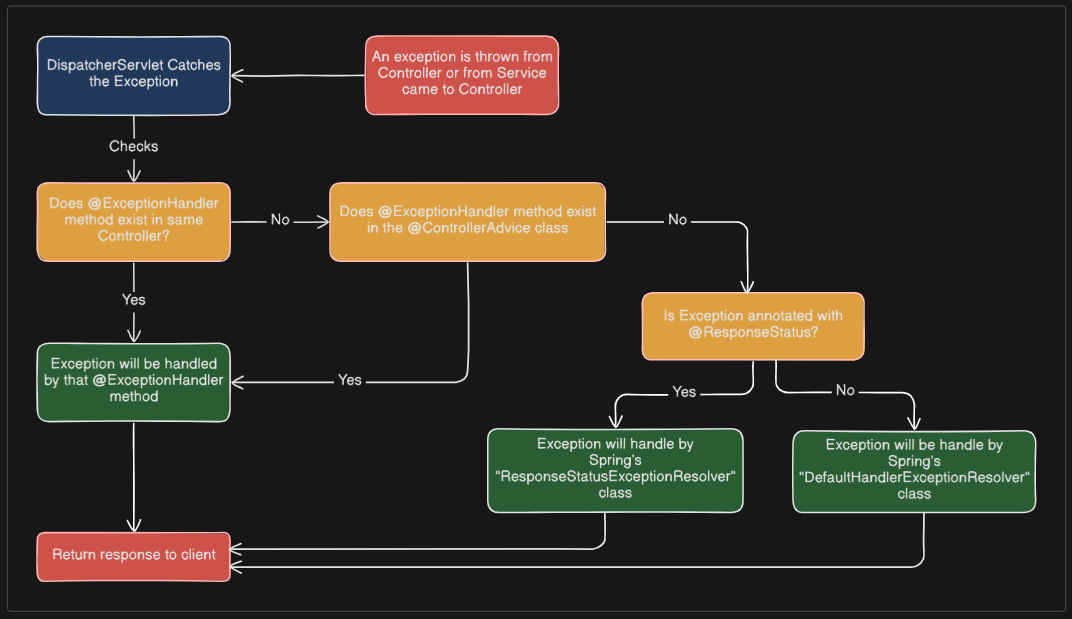
📝 Spring Boot Exception Handling Internal Flow
💡 Let’s understand how Spring Boot Exception Handling works.
🔝 Back to Top
🛠️ Different Ways to Handle Exceptions in Spring Boot
1️⃣ Using try-catch (Local Handling)
The simplest way: wrap risky code inside try-catch in service/controller.
@GetMapping("/product/{id}")
public ResponseEntity<?> getProduct(@PathVariable Long id) {
    try {
        Product product = productService.findById(id);
        return ResponseEntity.ok(product);
    } catch (ProductNotFoundException ex) {
        return ResponseEntity.status(HttpStatus.NOT_FOUND).body("❌ Product not found");
    }
}
✅ Simple but ❌ clutters controllers → not recommended for big apps.
2️⃣ Using @ExceptionHandler (Controller Level)
You can handle exceptions inside a controller using @ExceptionHandler.
@RestController
@RequestMapping("/products")
public class ProductController {

    @GetMapping("/{id}")
    public Product getProduct(@PathVariable Long id) {
        return productService.findById(id);
    }

    @ExceptionHandler(ProductNotFoundException.class)
    public ResponseEntity<String> handleProductNotFound(ProductNotFoundException ex) {
        return ResponseEntity.status(HttpStatus.NOT_FOUND).body("❌ " + ex.getMessage());
    }
}
✅ Keeps controller clean, but exception handling is limited to that controller.
3️⃣ Using @ControllerAdvice / @RestControllerAdvice (Global Handling 🌍 / ✅ Best Practice)
This is the industry standard approach for global exception handling.
@ControllerAdvice→ for MVC apps (views).@RestControllerAdvice→ for REST APIs (returns JSON).
@RestControllerAdvice
public class GlobalExceptionHandler {

    @ExceptionHandler(ProductNotFoundException.class)
    public ResponseEntity<ApiError> handleProductNotFound(ProductNotFoundException ex) {
        ApiError error = new ApiError(HttpStatus.NOT_FOUND, ex.getMessage(), LocalDateTime.now());
        return new ResponseEntity<>(error, HttpStatus.NOT_FOUND);
    }

    @ExceptionHandler(Exception.class) // fallback
    public ResponseEntity<ApiError> handleGeneral(Exception ex) {
        ApiError error = new ApiError(HttpStatus.INTERNAL_SERVER_ERROR, "⚠️ Something went wrong!", LocalDateTime.now());
        return new ResponseEntity<>(error, HttpStatus.INTERNAL_SERVER_ERROR);
    }
}
📝 DTO for response:
@Data
@AllArgsConstructor
public class ApiError {
    private HttpStatus status;
    private String message;
    private LocalDateTime timestamp;
}
✅ Centralized error handling, reusable & clean 🎯
4️⃣ Using ResponseStatusException
You can throw exceptions with HTTP status codes directly.
@GetMapping("/{id}")
public Product getProduct(@PathVariable Long id) {
    return productService.findById(id)
            .orElseThrow(() -> new ResponseStatusException(HttpStatus.NOT_FOUND, "❌ Product not found"));
}
✅ Quick, useful for simple APIs. ❌ Not very flexible for structured responses.
5️⃣ Using @ResponseStatus on Custom Exceptions
Annotate custom exceptions with HTTP status.
@ResponseStatus(HttpStatus.NOT_FOUND)
public class ProductNotFoundException extends RuntimeException {
    public ProductNotFoundException(String message) {
        super(message);
    }
}
When thrown, Spring automatically returns 404 Not Found.
✅ Clean, no extra handler needed.
❌ Less control over response body.
6️⃣ Extending ResponseEntityExceptionHandler (Spring Built-in)
Spring provides ResponseEntityExceptionHandler for handling common exceptions like validation, MethodArgumentNotValidException, etc.
@RestControllerAdvice
public class CustomRestExceptionHandler extends ResponseEntityExceptionHandler {

    @Override
    protected ResponseEntity<Object> handleMethodArgumentNotValid(
            MethodArgumentNotValidException ex, HttpHeaders headers,
            HttpStatus status, WebRequest request) {

        List<String> errors = ex.getBindingResult().getFieldErrors()
                .stream().map(err -> err.getField() + ": " + err.getDefaultMessage())
                .toList();

        ApiError apiError = new ApiError(HttpStatus.BAD_REQUEST, "Validation failed", errors);
        return new ResponseEntity<>(apiError, HttpStatus.BAD_REQUEST);
    }
}
✅ Best for handling Spring validation exceptions.
🏆 Industry Best Practice
✔️ Use @RestControllerAdvice with custom exceptions 🎯 (clean, centralized, standard).
✔️ Combine with ResponseEntityExceptionHandler for validation 🚀
✔️ Use @ResponseStatus for simple cases ⚡
🔝 Back to Top
🚀 Implementation
🏗️ Technology Stack
🖥️ Backend
- ☕ Java 21 → Core programming language
- 🌱 Spring Boot 3.5.5 → Main application framework
- 🗄️ Spring Data JPA → ORM layer for database access
- 🌐 Spring Web (Spring MVC) → REST APIs & Controller layer
📊 API Documentation
- 📘 Springdoc OpenAPI 2.8.9 → Generates OpenAPI 3 documentation
- 🎨 Swagger UI → Interactive API documentation & testing
🛢️ Database
- 🐬 MySQL → Primary relational database
- 🧩 MySQL Connector/J → JDBC driver for MySQL
🛠️ Build & Dependency Management
- 📦 Maven 4.0.0 → Build automation & dependency management
- 🚀 Spring Boot Maven Plugin → Runs & packages the application
- 🛠️ Maven Compiler Plugin → Annotation processing (with Lombok support)
⚙️ Utilities
- ✨ Lombok → Reduces boilerplate code (
@Getter,@Setter, etc.) - 📜 application.yml / application.properties → Centralized configuration (DB, JPA, Logging, etc.)
📂 Project Structure
spring-boot-exception-handling
│── 📂 src/
│   └── 📂 main/
│       ├── 📂 java/
│       │   └── 📂 com/sahu/springboot/basics/
│       │       ├── 📂 config/
│       │       │   ├── 📄 OpenApiConfig.java
│       │       │   └── 📄 OpenApiProperties.java
│       │       │
│       │       ├── 📂 constant/
│       │       │   └── 📄 ApiStatus.java
│       │       │
│       │       ├── 📂 controller/
│       │       │   └── 📂 rest/
│       │       │       └── 📄 ProductRestController.java
│       │       │
│       │       ├── 📂 dto/
│       │       │   ├── 📄 ApiResponse.java
│       │       │   ├── 📄 ProductRequest.java
│       │       │   └── 📄 ProductResponse.java
│       │       │
│       │       ├── 📂 exception/
│       │       │   ├── 📄 GlobalExceptionHandler.java
│       │       │   ├── 📄 ProductAlreadyExistException.java
│       │       │   └── 📄 ProductNotFoundException.java
│       │       │
│       │       ├── 📂 model/
│       │       │   └── 📄 Product.java
│       │       │
│       │       ├── 📂 repository/
│       │       │   └── 📄 ProductRepository.java
│       │       │
│       │       ├── 📂 service/
│       │       │   ├── 📂 impl/
│       │       │   │   └── 📄 ProductServiceImpl.java
│       │       │   │
│       │       │   └── 📄 ProductService.java
│       │       │
│       │       ├── 📂 util/
│       │       │   └── 📄 ProductUtil.java
│       │       │
│       │       └── 📄 SpringBootExceptionHandlingApplication.java
│       │
│       └── 📂 resources/
│           └── 📄 application.yml
│
├── 📄 docker-compose.yml
└── 📄 pom.xml
🔗 Code Repository
You can find the complete code repository for this project on GitHub:

🚀 To Run the Spring Boot Application
1️⃣ 🐳 Using Docker Compose (for MySQL container)
docker-compose up -d
✅ This starts MySQL in a container (-d = detached mode).
🔍 Verify with:
docker ps
📌 DB is now available at localhost:3307.
🔑 Credentials (username, password, DB name) are in docker-compose.yml.
2️⃣ 💻 Run Directly in IntelliJ IDEA
- 📂 Open the Spring Boot project in IntelliJ.
- ▶️ In Project Explorer, right-click the main class:
SpringBootExceptionHandlingApplication.java - Select Run ‘SpringBootExceptionHandlingApplication’.
- 🐞 For debugging, click the Debug button instead of Run.
- 🌐 App will start on http://localhost:9897.
3️⃣ ⚡ Run with Maven Command (CLI)
-
▶️ Run app:
mvn spring-boot:run -
🐞 Run app with debug mode:
mvn spring-boot:run -Dspring-boot.run.fork=false -Dmaven.surefire.debug -
📦 Build JAR and run:
mvn clean package -DskipTests
java -jar target/spring-boot-exception-handling-0.0.1-SNAPSHOT.jar
🔝 Back to Top
🎥 Video Reference
For a detailed running and demonstration of the application walkthrough,
watch the following YouTube video: