nirmalakumarsahu
Spring Boot Logging
| 📄 Articles | 👤 My Profile |







📑 Index
📝 What is Logging?
-
Logging is the process of recording information about the execution of an application.
-
It helps developers and system administrators to monitor, debug, and analyze the behavior of applications.
-
Logging captures which components (classes, methods, modules) were involved in execution, and possibly what data or context was present.
✨ Use-Cases of Logging
- 🧪 During unit testing: If a test fails, logs help you trace back why (which methods ran, what values were passed).
- 🐞 During bug fixing: Developer sees logs around where the error occurred to understand the state of the system.
- In production: When clients report bugs, logs show what the application was doing at the time of error.
- ⚡ In maintenance / incident diagnosis: If the application crashes or is down, logs help teams find root cause quickly.
- 📊 For disaster recovery: When recovering from database shutdown, crashes, or rollbacks, logs help understand what transactions/statuses were involved.
- 🛡️ For transaction management: Ensuring “all or nothing” principles (rollbacks, commits) and verifying what operations succeeded or failed.
✨ Logging Frameworks
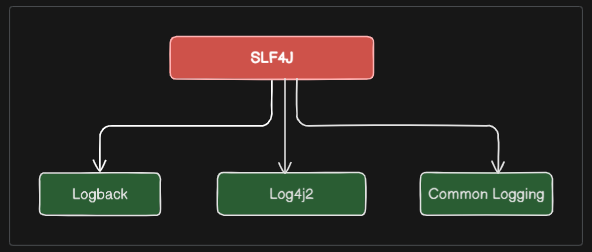
- SLF4J (Simple Logging Facade for Java): A facade or abstraction for various logging frameworks (e.g., java.util.logging, logback, log4j). It allows the end-user to plug in the desired logging framework at deployment time.
- Logback: A logging framework intended as a successor to the popular log4j project. It is designed to be faster and have a smaller memory footprint.
- Log4j2: An improved version of the original log4j framework,
- java.util.logging (JUL): The built-in logging framework provided by the Java standard library.
- Commons Logging: A thin adapter allowing configurable bridging to other logging frameworks.
- JULI: A logging framework used in Apache Tomcat, based on java.util.logging.
- JBoss Logging: A logging framework used in JBoss/WildFly application servers, providing integration with various logging backends.
- Log4j: The original Apache logging framework, which has been widely used in Java applications.
🔝 Back to Top
🔹 SLF4J
- SLF4J (Simple Logging Facade for Java) is a logging abstraction framework that provides a simple and unified API for various logging frameworks.
- It is a logging API (facade), not the implementation. It provides a unified interface so your code can log via SLF4J, but you can choose which backend (implementation) to use: Logback, Log4j2, JUL, etc.
- It decouples your code from specific logging implementation, making your application more flexible / maintainable.
- Supports features like parameterized messages (placeholders), so you avoid expensive string concatenation when the log level is disabled.
✨ Logging Levels in SLF4J
- TRACE 🔍: The most detailed level, used for fine-grained debugging information.
- DEBUG 🛠: Used for general debugging information, less detailed than TRACE.
- INFO ℹ️: Used for informational messages that highlight the progress of the application.
- WARN ⚠️: Used for potentially harmful situations that are not errors but may require attention.
- ERROR ❌: Used for error events that might still allow the application to continue running.
- FATAL: Used for very severe error events that will presumably lead the application to abort. (Note: SLF4J does not have a FATAL level; it is typically mapped to ERROR in most implementations.)
- OFF 🔕: Used to turn off logging.
- ALL 📡: Used to enable all logging levels.
✅ Best Practices / Tips
- Use parameterized logging:
logger.debug("User {} logged in at {}", user, time);instead of string concatenation. It avoids creating string objects when that log level is disabled. - Do not log sensitive information (passwords, credentials, personal data).
- Use appropriate log levels:
- TRACE / DEBUG for developer diagnostics
- INFO for high-level flow / status
- WARN for anomalies not causing failure
- ERROR for failures
- Use MDC (Mapped Diagnostic Context) for context per request/user etc., so logs can be correlated.
- Use rolling logs, retention policy, compression for older logs to manage disk space.
- Use async appenders when possible for high throughput to avoid blocking main threads.
- Separate logging configuration from code (properties, xml files), so you can adjust behavior per environment (dev, test, prod) without changing code.
- Ensure logging errors themselves don’t crash the application (e.g., I/O failures of log file should be handled gracefully). Logback does well in this.
- Regularly review and clean up logs to avoid excessive verbosity and ensure relevant information is captured.
- Use structured logging (JSON format) for easier parsing and analysis in log management systems
- Integrate with log management/analysis tools (ELK stack, Splunk, etc.) for better insights.
Great question 🙌 – understanding appenders is the key to mastering Logback (and logging in general).
In Logback, an Appender is responsible for writing log events to a particular destination (console, file, DB, socket, etc.).
🔝 Back to Top
📦 Types of Appenders
💻 ConsoleAppender
- Destination: Writes logs to
System.out(console). - Usage: Best for development or containerized apps (Docker, Kubernetes →
kubectl logs). -
Pros:
- Easy to view logs in real time.
- Good for debugging locally.
-
Cons:
- Logs disappear if console is cleared.
- Not enough for production alone.
<appender name="CONSOLE" class="ch.qos.logback.core.ConsoleAppender">
    <encoder>
        <pattern>%d [%thread] %-5level %logger{36} - %msg%n</pattern>
    </encoder>
</appender>
📄 FileAppender
- Destination: Writes logs to a single file.
- Usage: Small apps, dev environments.
- Cons: File grows endlessly → not practical for production.
📂 RollingFileAppender ✅ (Most Common in Production)
- Destination: Writes logs to a file, then rolls (rotates) them based on time or size.
- Usage: Production apps → keeps logs manageable.
-
Supports:
- TimeBasedRollingPolicy (daily logs, monthly, etc.)
- SizeBasedTriggeringPolicy (rotate after X MB/GB).
<appender name="FILE" class="ch.qos.logback.core.rolling.RollingFileAppender">
    <file>logs/app.log</file>
    <rollingPolicy class="ch.qos.logback.core.rolling.TimeBasedRollingPolicy">
        <fileNamePattern>logs/archive/app.%d{yyyy-MM-dd}.log.gz</fileNamePattern>
        <maxHistory>30</maxHistory>
    </rollingPolicy>
</appender>
🚀 AsyncAppender
- Destination: Wraps another appender (e.g.,
FILE,JSON). - Usage: Improves performance by logging in a separate thread.
- Why? Logging I/O (disk, network) can block business threads. Async avoids this.
- Best Practice: Always wrap FILE and JSON appenders in
AsyncAppender.
<appender name="ASYNC_FILE" class="ch.qos.logback.classic.AsyncAppender">
    <appender-ref ref="FILE"/>
</appender>
🌐 SocketAppender
- Destination: Sends logs over TCP/UDP sockets to a remote server (e.g., Logstash, Splunk).
- Usage: Live streaming of logs to a centralized system.
- Example: Instead of writing JSON to a file → send JSON directly to Logstash via TCP.
🗄 DBAppender
- Destination: Writes logs into a relational database (JDBC).
- Usage: Rarely used in modern apps (performance hit, DB not ideal for logs).
- Cons: DB bloating, slower inserts.
🧩 SiftingAppender
- Destination: Creates separate log files per context (e.g., per user, per tenant, per thread).
- Usage: Multi-tenant apps, debugging specific users.
- Example: Each user gets a separate log file.
🛠 Custom Appenders
- You can write your own by extending
AppenderBase. - Example: Send logs to Kafka, CloudWatch, or Elasticsearch directly.
🔑 Summary Table
| Appender | Destination | Best Use Case |
|---|---|---|
ConsoleAppender |
Console / stdout | Dev, Docker logs |
FileAppender |
Single file | Small apps only |
RollingFileAppender |
Rotating files | Production logging |
AsyncAppender |
Non-blocking wrapper | High-performance prod apps |
SocketAppender |
Remote server (TCP/UDP) | Live streaming to ELK/Splunk |
DBAppender |
Database table | Rare, audit logging |
SiftingAppender |
Per-user/tenant files | Multi-tenant apps |
CustomAppender |
Any destination | Cloud/Kafka/etc. |
✅ Best Practice for Production:
- Always use ConsoleAppender (for container logs).
- Use RollingFileAppender (with
AsyncAppender) for file-based persistence. - Use JSON Appender (Logstash encoder) or SocketAppender for ELK.
🔝 Back to Top
⚙️ Logging in Spring Boot
- Spring Boot uses SLF4J as the logging facade and Logback as the default logging implementation.
- It provides a default configuration that is suitable for most applications, but you can customize it as needed.
- Spring Boot automatically configures logging based on the presence of certain dependencies in the classpath.
Note:
- You don’t need to add extra dependencies if using Spring Boot Starter.
spring-boot-starteralready includes: SLF4J API and Logback (default implementation). - If you want another logger (e.g., Log4j2), you exclude Logback and add
spring-boot-starter-log4j2.
🖊️ Using SLF4J in Code
You typically declare a logger like this:
Option 1: Classic
import org.slf4j.Logger;
import org.slf4j.LoggerFactory;
import org.springframework.stereotype.Service;

@Service
public class MyService {
    private static final Logger log = LoggerFactory.getLogger(MyService.class);

    public void processData() {
        log.info("Process started");
        log.debug("Processing with parameters x={}, y={}", 10, 20);
        try {
            int result = 10 / 0;
        } catch (Exception e) {
            log.error("Error occurred: ", e);
        }
    }
}
Option 2: Lombok
If you use Lombok, just annotate with @Slf4j:
import lombok.extern.slf4j.Slf4j;
import org.springframework.stereotype.Service;

@Slf4j
@Service
public class MyService {
    public void processData() {
        log.info("Process started");
    }
}
⚙️ Configuration
Default (no config file)
Spring Boot logs to the console in INFO level with a nice format:
2025-09-21 10:23:45.123 INFO 12345 --- [main] c.e.demo.MyService : Process started
application.properties
You can control logging easily:
# Set global log level
logging.level.root=INFO

# Package-specific logging
logging.level.com.example.demo=DEBUG
logging.level.org.springframework.web=ERROR

# Log file output
logging.file.name=app.log
logging.file.path=logs

# Pattern customization
logging.pattern.console=%d{yyyy-MM-dd HH:mm:ss} - %msg%n
logging.pattern.file=%d{yyyy-MM-dd HH:mm:ss} [%thread] %-5level %logger{36} - %msg%n
logback-spring.xml (advanced)
For full control, create src/main/resources/logback-spring.xml:
<configuration>
    <appender name="STDOUT" class="ch.qos.logback.core.ConsoleAppender">
        <encoder>
            <pattern>%d{HH:mm:ss.SSS} [%thread] %-5level %logger{36} - %msg%n</pattern>
        </encoder>
    </appender>

    <appender name="FILE" class="ch.qos.logback.core.FileAppender">
        <file>logs/app.log</file>
        <append>true</append>
        <encoder>
            <pattern>%d %-5level %logger{36} - %msg%n</pattern>
        </encoder>
    </appender>

    <root level="INFO">
        <appender-ref ref="STDOUT" />
        <appender-ref ref="FILE" />
    </root>
</configuration>
Best Practices logback-spring.xml
<?xml version="1.0" encoding="UTF-8"?>
<configuration scan="true" scanPeriod="30 seconds">

    <!-- Import Spring Boot properties for dynamic values -->
    <springProperty scope="context" name="APP_NAME" source="spring.application.name"/>
    <springProperty scope="context" name="LOG_PATH" source="logging.file.path" defaultValue="./logs"/>
    <springProperty scope="context" name="LOG_LEVEL" source="logging.level.root" defaultValue="INFO"/>

    <!-- Define log pattern -->
    <property name="LOG_PATTERN"
              value="%d{yyyy-MM-dd HH:mm:ss.SSS} [%thread] %-5level %logger{36} - %msg%n"/>

    <!-- Console appender (for local/dev environments) -->
    <appender name="CONSOLE" class="ch.qos.logback.core.ConsoleAppender">
        <encoder>
            <pattern>${LOG_PATTERN}</pattern>
        </encoder>
    </appender>

    <!-- Rolling file appender (for prod/staging environments) -->
    <appender name="FILE" class="ch.qos.logback.core.rolling.RollingFileAppender">
        <file>${LOG_PATH}/${APP_NAME}.log</file>
        <rollingPolicy class="ch.qos.logback.core.rolling.TimeBasedRollingPolicy">
            <!-- Daily rollover -->
            <fileNamePattern>${LOG_PATH}/archive/${APP_NAME}.%d{yyyy-MM-dd}.log.gz</fileNamePattern>
            <!-- Keep logs for 30 days -->
            <maxHistory>30</maxHistory>
            <!-- Limit total size -->
            <totalSizeCap>5GB</totalSizeCap>
        </rollingPolicy>
        <encoder>
            <pattern>${LOG_PATTERN}</pattern>
        </encoder>
    </appender>

    <!-- Async wrapper to avoid blocking on I/O -->
    <appender name="ASYNC_FILE" class="ch.qos.logback.classic.AsyncAppender">
        <appender-ref ref="FILE"/>
        <queueSize>5000</queueSize>
        <discardingThreshold>0</discardingThreshold>
    </appender>

    <!-- Root logger -->
    <root level="${LOG_LEVEL}">
        <appender-ref ref="CONSOLE"/>
        <appender-ref ref="ASYNC_FILE"/>
    </root>

    <!-- Fine-grained logging control -->
    <logger name="org.springframework" level="INFO"/>
    <logger name="org.hibernate.SQL" level="DEBUG"/> <!-- show SQL only if needed -->
    <logger name="com.example" level="DEBUG"/> <!-- your application package -->

</configuration>
📊 Advanced Features
- Async logging → prevents slow disk writes from blocking app
- Rolling logs → keeps logs manageable (e.g., rotate daily, keep 7 days)
- JSON logs → structured logging for ELK/Datadog
- MDC (Mapped Diagnostic Context) → add request/user ID to logs
Example with MDC:
import org.slf4j.MDC;

MDC.put("userId", "123");
log.info("Processing request");
// output: userId=123 Processing request
MDC.clear();
🔄 How to Use Log4j2 Instead of Logback
Sometimes you want Log4j2 (better performance, async logging, advanced JSON layouts).
✅ Steps:
Step 1: Exclude Logback
Remove default Logback dependency:
<dependency>
    <groupId>org.springframework.boot</groupId>
    <artifactId>spring-boot-starter</artifactId>
    <exclusions>
        <exclusion>
            <groupId>org.springframework.boot</groupId>
            <artifactId>spring-boot-starter-logging</artifactId>
        </exclusion>
    </exclusions>
</dependency>
Step 2: Add Log4j2 Dependencies
<dependency>
    <groupId>org.springframework.boot</groupId>
    <artifactId>spring-boot-starter-log4j2</artifactId>
</dependency>

<!-- For JSON logging (optional, for ELK) -->
<dependency>
    <groupId>com.fasterxml.jackson.core</groupId>
    <artifactId>jackson-databind</artifactId>
</dependency>
Step 3: Add log4j2-spring.xml
Place inside src/main/resources/:
<?xml version="1.0" encoding="UTF-8"?>
<Configuration status="WARN">
    <Properties>
        <Property name="LOG_PATTERN">%d{yyyy-MM-dd HH:mm:ss.SSS} [%t] %-5level %logger{36} - %msg%n</Property>
        <Property name="LOG_PATH">logs</Property>
    </Properties>

    <Appenders>
        <!-- Console -->
        <Console name="Console" target="SYSTEM_OUT">
            <PatternLayout pattern="${LOG_PATTERN}"/>
        </Console>

        <!-- Rolling File -->
        <RollingFile name="File" fileName="${LOG_PATH}/app.log"
                     filePattern="${LOG_PATH}/archive/app-%d{yyyy-MM-dd}.log.gz">
            <PatternLayout pattern="${LOG_PATTERN}"/>
            <Policies>
                <TimeBasedTriggeringPolicy/>
            </Policies>
        </RollingFile>
    </Appenders>

    <Loggers>
        <Root level="info">
            <AppenderRef ref="Console"/>
            <AppenderRef ref="File"/>
        </Root>
        <Logger name="com.example" level="debug" additivity="false">
            <AppenderRef ref="Console"/>
        </Logger>
    </Loggers>
</Configuration>
Step 4: Use Same SLF4J API or @Slf4j of Lombok
You don’t change your Java code:
private static final Logger log = LoggerFactory.getLogger(MyService.class);
if you are using Lombok, just keep @Slf4j.
➡️ Behind the scenes, it will use Log4j2 instead of Logback.
🔑 Key Differences (Logback vs Log4j2 in Spring Boot)
| Feature | Logback (default) | Log4j2 |
|---|---|---|
| Default in Spring Boot | ✅ Yes | ❌ No |
| Performance | Good | ⚡ Better (async by default) |
| JSON support | Via Logstash encoder | Native layouts |
| Config file | logback-spring.xml |
log4j2-spring.xml |
| Async logging | Needs AsyncAppender |
Built-in with LMAX Disruptor |
| Extensibility | High | Higher |
✅ Best Practice:
- Use Logback if you want simple + Spring Boot defaults.
- Use Log4j2 if you need high-performance async logging or native JSON layouts.