nirmalakumarsahu
Spring Boot Security Form-Based Authentication with Database
| 📄 Articles | 👤 My Profile |




📑 Index
📋 Prerequisites
🔹 Understand Spring Security basic concepts 👉 Read here
🔝 Back to Top
📝 Spring Boot Security Internal Flow
💡 Let’s understand how Spring Boot Security works with a database for form-based authentication.
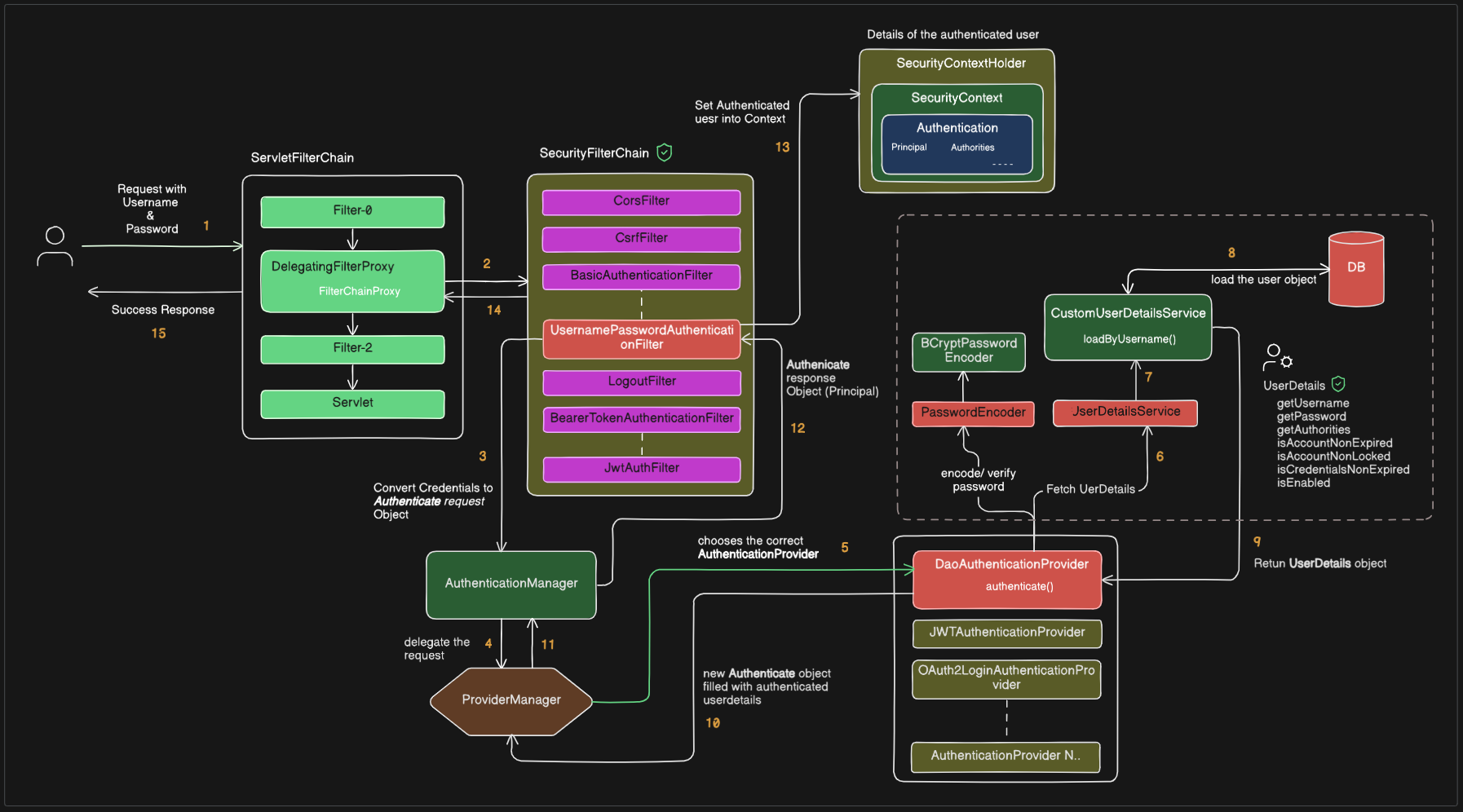
1. Request with Credentials
- The client sends a request with a username and password (e.g., via login form, API call).
- This request enters the Servlet Filter Chain.
2. DelegatingFilterProxy & FilterChainProxy
- Spring Security uses
DelegatingFilterProxyto intercept requests. - It passes the request to the SecurityFilterChain, which contains security-related filters (authentication, authorization, CSRF, CORS, etc.).
3. Filter Converts Credentials
- The UsernamePasswordAuthenticationFilter extracts the username and password from the request.
- It creates an Authentication request object (with credentials but not yet authenticated).
4. AuthenticationManager
- The request is passed to the AuthenticationManager.
5. ProviderManager
AuthenticationManagerdelegates to ProviderManager.ProviderManagerchooses the correct AuthenticationProvider (e.g.,DaoAuthenticationProviderfor username/password authentication).
6. Fetch User Details
-
The provider calls the UserDetailsService to fetch user information.
-
7. Load User by Username
- The
CustomUserDetailsServiceimplementsloadUserByUsername()to retrieve the user. - This may involve fetching user data from a database.
8. Database Call
- A query is made to load the user’s record from the database.
9. UserDetails Object
-
The database results are mapped to a UserDetails object, which contains:
- Username
- Password (hashed)
- Authorities (roles/permissions)
- Account status flags (expired, locked, enabled, etc.).
10. Return Authenticated Object
- The provider compares the password from the request with the stored hash using PasswordEncoder (
BCryptPasswordEncoderhere). - If successful, a new Authentication object is created, now filled with authenticated user details.
11. Authentication Response
- The authenticated object is returned back up the chain to the AuthenticationManager.
12. Filter Receives Authentication Response
- The
UsernamePasswordAuthenticationFiltergets the authenticated object from the manager.
13. Set Authenticated User into Context
- The authenticated object (with user details) is stored inside the SecurityContext using
SecurityContextHolder.
14. Continue Filter Chain
- The request proceeds through the remaining filters.
15. Success Response
- The server returns a successful response to the client.
- Now, in any part of the application, you can retrieve the authenticated user from:
Authentication auth = SecurityContextHolder.getContext().getAuthentication();
Object principal = auth.getPrincipal();
🔝 Back to Top
🚀 Implementation
🏗️ Technology Stack
🖥️ Backend
- ☕ Java 21 → Core programming language
- 🌱 Spring Boot 3.5.4 → Main application framework
- 🗄️ Spring Data JPA → ORM layer for database interaction
- 🔐 Spring Security → Authentication & Authorization
- 🌐 Spring Web (Spring MVC) → REST APIs & Controller layer
🎨 Frontend
- 📝 Thymeleaf → Template engine for dynamic HTML rendering
- 🔑 Thymeleaf Extras – Spring Security 6 → Security tags in views (
sec:authorize)
🛢️ Database
- 🐬 MySQL → Primary relational database
- 🧩 MySQL Connector/J → JDBC driver for MySQL
🏗️ Build & Dependency Management
- 📦 Maven 4.0.0 → Build automation & dependency management
- 🚀 Spring Boot Maven Plugin → Runs & packages the app
- 🛠️ Maven Compiler Plugin → Annotation processing (with Lombok)
⚙️ Utilities
- ✨ Lombok → Eliminates boilerplate code (
@Getter,@Setter, etc.) - 📜 application.yml → Centralized configuration (DB, Security, JPA, etc.)
📂 Project Structure
spring-boot-security-using-database-form-based
│── 📂 src/
│   └── 📂 main/
│       ├── 📂 java/
│       │   └── 📂 com/sahu/springboot/security/
│       │       ├── 📂 config/
│       │       │   ├── 📄 CustomAuthenticationEntryPoint.java
│       │       │   └── 📄 SecurityConfig.java
│       │       │
│       │       ├── 📂 constant/
│       │       │   └── 📄 AuthConstants.java
│       │       │
│       │       ├── 📂 controller/
│       │       │   ├── 📄 AuthController.java
│       │       │   └── 📄 HomeController.java
│       │       │
│       │       ├── 📂 dto/
│       │       │   └── 📄 UserRequest.java
│       │       │
│       │       ├── 📂 model/
│       │       │   ├── 📄 Role.java
│       │       │   └── 📄 User.java
│       │       │
│       │       ├── 📂 repository/
│       │       │   ├── 📄 RoleRepository.java
│       │       │   └── 📄 UserRepository.java
│       │       │
│       │       ├── 📂 security/
│       │       │   ├── 📂 dto/
│       │       │   │   └── 📄 CustomUserDetails.java
│       │       │   │
│       │       │   └── 📂 util/
│       │       │       └── 📄 SecurityUtil.java
│       │       │
│       │       ├── 📂 service/
│       │       │   ├── 📂 impl/
│       │       │   │   ├── 📄 CustomUserDetailsService.java
│       │       │   │   └── 📄 UserServiceImpl.java
│       │       │   │
│       │       │   └── 📄 UserService.java
│       │       │
│       │       └── 📄 SpringBootSecurityUsingDatabaseFormBasedApplication.java
│       │
│       └── 📂 resources/
│           ├── 📂 static/
│           │
│           ├── 📂 templates/
│           │   ├── 📂 error/
│           │   │   └── 📄 403.html
│           │   │
│           │   ├── 📄 admin-dashboard.html
│           │   ├── 📄 dashboard.html
│           │   ├── 📄 login.html
│           │   ├── 📄 registration.html
│           │   └── 📄 user-dashboard.html
│           │
│           └── 📄 application.yml
│
├── 📄 docker-compose.yml
└── 📄 pom.xml
🔗 Code Repository
You can find the complete code repository for this project on GitHub:

🚀 To Run the Spring Boot Application
1️⃣ 🐳 Using Docker Compose (for MySQL container)
docker-compose up -d
✅ This starts MySQL in a container (-d = detached mode).
🔍 Verify with:
docker ps
📌 DB is now available at localhost:3307.
🔑 Credentials (username, password, DB name) are in docker-compose.yml.
2️⃣ 💻 Run Directly in IntelliJ IDEA
- 📂 Open the Spring Boot project in IntelliJ.
- ▶️ In Project Explorer, right-click the main class:
SpringBootSecurityUsingDatabaseFormBasedApplication.java - Select Run ‘SpringBootSecurityUsingDatabaseFormBasedApplication’.
- 🐞 For debugging, click the Debug button instead of Run.
- 🌐 App will start on http://localhost:9897.
3️⃣ ⚡ Run with Maven Command (CLI)
-
▶️ Run app:
mvn spring-boot:run -
🐞 Run app with debug mode:
mvn spring-boot:run -Dspring-boot.run.fork=false -Dmaven.surefire.debug -
📦 Build JAR and run:
mvn clean package -DskipTests
java -jar target/spring-boot-security-using-database-form-based-0.0.1-SNAPSHOT.jar
🔝 Back to Top
🎥 Video Reference
For a detailed running and demonstration of the application walkthrough,
watch the following YouTube video: